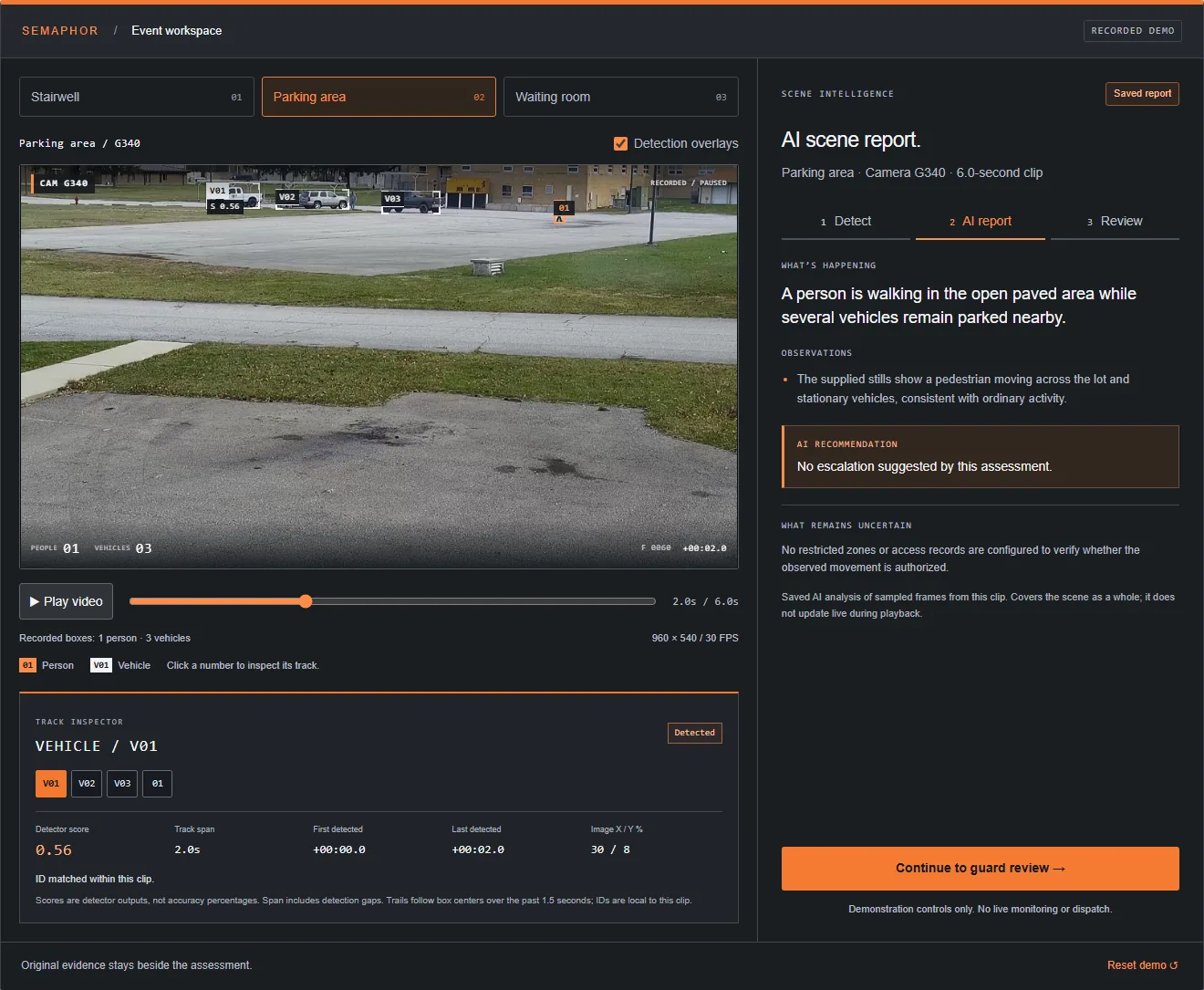
Semaphor in one paragraph.
Semaphor is AI video monitoring assistance for security operators. It watches the same monitoring screen your guard watches — the rendered video wall, VMS client or camera dashboard — separates every camera pane, detects people and vehicles, and pushes the moments that matter into a single guard inbox with the original frames and an AI-written scene report beside them. It does not need camera credentials, a vendor API or a new video management system. You keep the cameras and camera software you already run. Semaphor adds the attention layer on top. If you are new to the category, start with our guide to what AI video monitoring is; if you want the short version, it is this: more cameras, clearer priorities.
Who Semaphor is for.
Semaphor is built for the operations where one person is responsible for a lot of glass:
- Security guard companies with a guard at a desk watching a site’s cameras between rounds. See Semaphor for security guard companies.
- Remote video monitoring centers where operators rotate through dozens of client sites on one video wall. See remote video monitoring centers.
- GSOCs and corporate security teams covering campuses, offices and critical facilities from one console.
- Small and mid-size operators who need modern AI but cannot justify a premium enterprise platform or a camera refresh. See small security companies.
Every solution page covers how a specific kind of operation runs Semaphor, and our use cases by site type cover what guards watch at parking lots, lobbies, construction sites, warehouses and more.
The problem it solves.
Camera counts keep climbing. Guard headcount does not. The result is a familiar picture in every monitoring room: a wall of tiles, one operator, and a quiet hope that nothing important happens on the camera nobody is looking at.
Guards cannot watch every camera.
A video wall shows everything and highlights nothing. A guard on a busy post is answering the phone, logging a delivery, writing a report or walking a round. Every minute away from the screen is a minute no one is watching. Our guide on how many cameras one guard can monitor goes deeper on the real limits.
Attention fades.
Staring at unchanging tiles wears people down. A widely quoted industry figure (Ainsworth, 2002) holds that after 12 minutes of continuous video monitoring an operator will often miss up to 45% of screen activity, as discussed on IPVM. Whatever the exact number at your site, every operator knows the effect: the third hour of a night shift is not the first.
Nuisance alerts bury real ones.
Basic motion alerts fire on headlights, rain, swaying trees and the same parked car all night. Guards learn to clear them without looking. That is how a real event gets dismissed. We cover the fix in how to reduce nuisance alerts.
Upgrades mean rip-and-replace.
Most analytics require specific cameras, a specific VMS, a license tier or an integration project with a vendor. For a guard company serving many clients on many systems, that is a non-starter. Semaphor removes the dependency entirely by working from the screen.
How Semaphor works.
Semaphor runs one loop, continuously, on the monitoring screen: observe, react, analyze, deliver. The full walkthrough is on how Semaphor works.
Observe the screen.
Capture the monitoring screen, separate each camera pane and give every view a visual identity that follows it as the layout cycles, resizes or rearranges. A camera cycled off-screen is marked unobserved — never assumed quiet.
React to what matters.
A local detector finds people and vehicles; pixel-change checks catch substantial scene changes. Event routing suppresses duplicates and applies cooldowns so the same parked car does not alert all night.
Alert first, then explain.
A preliminary alert lands in the guard inbox immediately with the original frames. A vision-language model then reviews the event and updates the same card with a scene report.
Analyze with context.
The AI scene report states what is happening, what it observed, a recommendation such as guard review suggested or no escalation, and what remains uncertain.
Deliver to the inbox.
Cards sort by Critical, High, Unassessed and Low. Guards acknowledge, review the evidence, override priority and close after review.
Keep the evidence.
Every frame and crop keeps its original image with SHA-256 and perceptual hashes, exportable manifests and automatic bounded retention.
Main features.
Every capability is built around one idea: the guard stays in control, and Semaphor makes their attention count. Browse them all on the features hub.
- Works with your existing camera software — screen-based and VMS-agnostic. No camera replacement, no new VMS.
- Person and vehicle detection — a local detector with clip-local tracks and rechecks that keep still and seated people supported.
- Alert-first review — guards see that something moved before the AI finishes thinking.
- AI scene reports — summary, observations, recommendation and uncertainty, with the evidence beside them.
- Alert prioritization — Critical, High, Unassessed and Low, with guard overrides.
- Evidence and audit trail — original frames, exact and perceptual hashes, manifests and bounded retention.
- Camera view tracking — pane separation and feed identity across cycling layouts, with coverage gaps made explicit.
- Duplicate alert suppression — event routing and cooldowns that keep the inbox focused.
- Guard inbox — one sorted queue for acknowledging, reviewing and closing events, built for shift handoff.
- Security and privacy — local processing option, verified HTTPS for hosted inference, no camera credentials, no facial recognition.
Why operators choose Semaphor.
What guards deal with today.
- A video wall with no sense of priority.
- Motion alerts that fire on weather and shadows.
- Scrubbing recordings after the fact to find what happened.
- Different camera systems at every client site.
What Semaphor surfaces.
- The camera that needs attention, and why.
- People and vehicles, not every flicker.
- Original frames and a scene report on one card.
- One workflow on top of whatever software each site runs.
Cover more cameras without more guards. Semaphor does the continuous watching; your guard does the judging. Read how operators approach this in covering more cameras without more guards.
No rip-and-replace. If your guard can see it on the monitoring screen, Semaphor can work with it. That is a different model from VMS-integrated analytics, and we lay out the trade-offs in screen-based vs VMS-integrated analytics. More side-by-sides live on the comparisons hub.
Human judgment, always. The AI writes a report; the guard decides and dispatches. Semaphor never closes an alert on its own and never calls police. That is human-in-the-loop security AI by design.
Evidence you can stand behind. Original frames sit beside every AI assessment, hashed at capture, so an incident report is built on what the camera showed rather than what a model said.
Ahead of the curve. Fire and smoke detection, a spatial scene model, object memory and symbolic event timelines are in active development. See what we’re building next and get early access as a pilot partner.
How to get started.
Getting started is deliberately small. Start with one monitoring station:
- Book a live demo on your own camera screens. We show Semaphor working on the layouts your guards actually use. Book a live demo.
- Run a pilot. Confirm capture quality, dashboard layouts and the situations your operators need surfaced. Measure missed events, nuisance alerts, response delay and evidence review time. See how a pilot works.
- Expand on evidence. Roll out station by station where the results earn it.
Want to learn more first? Our guides cover the fundamentals, from video analytics to post orders, and the FAQ answers the practical questions operators ask before a pilot.
Want the story behind the product? Read about Semaphor Systems, or see why adding AI software beats replacing cameras for most operators.
Frequently asked questions.
What is Semaphor Systems?
Semaphor Systems builds AI video monitoring assistance for security operators. Its software watches the monitoring screens guards already use, detects people and vehicles, and delivers focused alerts with original evidence and AI scene reports to a guard inbox.
Does Semaphor replace my VMS?
No. Semaphor works on top of your existing video management system or camera dashboard by observing the rendered monitoring screen. You keep your VMS, your recordings and your camera setup. There is no vendor integration project.
Does Semaphor replace guards?
No. Semaphor is built to augment guards, not replace them. It does the continuous watching and brings the right camera forward; the guard reviews the evidence, decides what happens and dispatches. The AI never closes an alert or calls for a response on its own.
What cameras does Semaphor work with?
Semaphor is camera-agnostic because it works from the screen, not the camera. If a camera’s view appears on your monitoring screen, Semaphor can observe it — no camera credentials or vendor APIs required. We confirm capture quality on your layouts during a pilot.
Is Semaphor a remote guarding service?
No. Semaphor is software your own operators use. It makes your guards and monitoring center more effective; it does not substitute an outside monitoring team for them.