The short definition.
AI video monitoring is the practice of using software to watch security camera video continuously, pick out people, vehicles and activity that matter, explain what is happening, and hand a focused alert to a human operator who decides what to do. It is not a camera, and it is not a recorder. It is a layer of attention that sits between the video your cameras already produce and the guard or operator responsible for responding.
The term covers a wide range of products, from simple person-detection add-ons in a camera app to full platforms at monitoring centers. What they share is a goal: stop depending on a tired person noticing a small change on one tile among dozens. Semaphor is one example of this category, built specifically for guards and operators who already sit in front of monitoring screens. If you want the product view first, read what Semaphor is and how it works.
How it differs from traditional CCTV monitoring.
Traditional CCTV monitoring is a person watching a grid. A guard at a lobby desk has a monitor split into sixteen views. An operator at a monitoring station has a video wall and a cycling layout. Nothing on the screen asks for attention; the operator has to find the event. On a quiet night that means hours of looking at empty parking rows, dark stairwells and locked doors, and the one view that matters looks exactly like the others until someone happens to glance at it.
AI video monitoring flips that relationship. The software watches every view all the time and raises its hand when something changes in a way that matters. The operator stops scanning and starts reviewing. That is the whole point: people are good at judging a situation and poor at staring at still images for a full shift.
How it differs from motion alerts.
Most camera systems and VMS platforms already offer motion detection. It compares pixels between frames and fires when enough of them change. The problem is that pixels change for many reasons nobody cares about: headlights sweeping a wall, rain, a flag, a tree, a shadow moving with the sun, a camera auto-adjusting at dusk. Operators who live with raw motion alerts learn to ignore them, which is worse than having none.
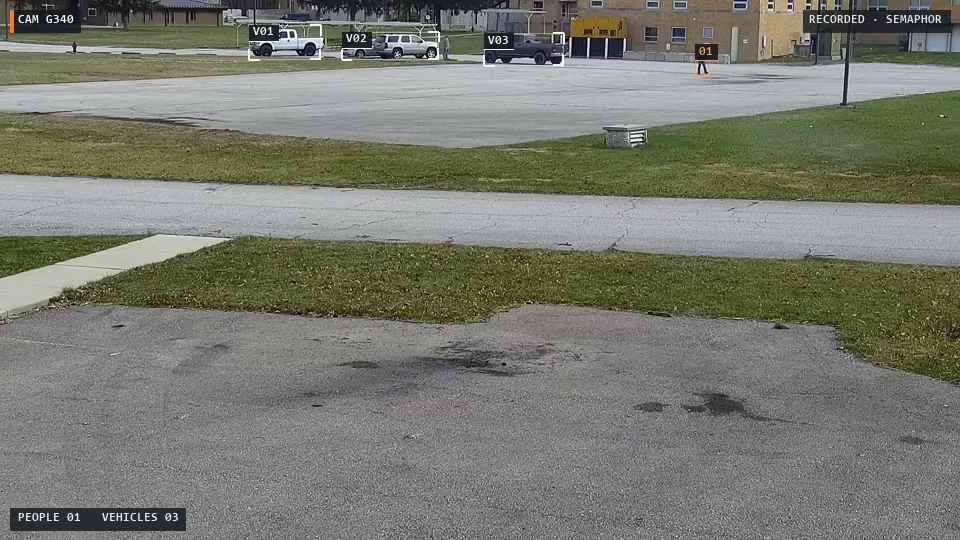
AI monitoring asks a different question. Instead of "did pixels change?" it asks "is there a person or vehicle here, is it new, and does it matter at this site right now?" That difference is covered in depth in AI video analytics vs motion detection, and the practical side is in our guide to reducing nuisance alerts.
The four components.
Detection
Computer vision models find people and vehicles in each frame and draw a box around them with a confidence score. This is the foundation. See how object detection works on security cameras.
Analytics
Rules and tracking turn raw detections into events: a new person in a view, a vehicle that has not moved in hours, the same parked car that should not alert again. This is classic video analytics.
AI reasoning
A vision-language model looks at the frames and writes a short report: what is happening, what it noticed, a recommendation and what remains uncertain. That context is what turns a box into something a guard can act on.
The fourth component is the one that makes the other three safe to use: human review. The alert lands in front of a guard with the original evidence beside the AI assessment, and the guard decides whether to dispatch, call the client, talk down through a speaker or close the event. We explain why that matters in human-in-the-loop security AI.
What it does well.
- Coverage. Every camera view gets watched every moment, including the ones cycled off the main wall and the ones a busy guard stopped looking at an hour ago.
- Focus. Guards review a short list of events instead of scanning a grid. That is how teams cover more cameras without more guards.
- Context. A written scene report tells the guard what to look at before they open the clip, which speeds up the call on whether to escalate.
- Evidence. Good systems keep the original frames with every alert, so the incident report, the client email and the police call all point to the same pictures.
- Consistency. The software does not get bored at 3 a.m., during a double shift or on the fourth hour of a holiday weekend.
Where it falls short.
AI monitoring is not magic, and buyers should hear that plainly. Detection gets harder at night, in rain, at long range and when a person is half hidden behind a car or a column. Language models can describe a scene confidently and still be wrong about intent. A person in a parking lot at midnight could be a tenant or a thief; the software cannot know which without site context. And no AI system should be the thing that decides to call police or ignore an event. That judgment belongs to the operator, which is why the best systems are built around the guard rather than around replacing them.
The honest test of any AI monitoring product is simple: does it show the guard the original evidence next to its opinion, and does the guard stay in control of every decision?
How to evaluate an AI video monitoring product.
- Ask what it needs from your cameras. Some platforms require new cameras, some need camera credentials or a VMS integration per vendor. Others, like Semaphor, work from the monitoring screen you already use.
- Look at the alert, not the dashboard. What does the guard actually see? Is the original frame there? Is the AI explanation readable in seconds?
- Check duplicate handling. The same parked car should not alert all night. Ask how cooldowns and duplicate suppression work.
- Test on your own footage. Demo clips prove the concept. Your sites, your lighting and your layouts prove the product.
- Measure a pilot. Missed events, nuisance alerts, response delay and evidence review time. Our guide to running an AI monitoring pilot lays out the steps.
Where Semaphor fits.
Semaphor is AI video monitoring assistance built for the people who already watch cameras for a living. It captures the monitoring screen your guards use, separates the camera panes, runs person and vehicle detection locally and publishes an alert the moment something moves. A vision-language model then adds an AI scene report to the same card, with the original evidence right beside it. No camera replacement, no new VMS and no vendor integration project. Your guards keep the final word on every event.
The fastest way to judge it is to watch it work. Book a live demo on your own camera screens, or start a pilot with one monitoring station and measure it against your current shift. New terms along the way are defined in the glossary.
Frequently asked questions.
Is AI video monitoring the same as video analytics?
Video analytics is one part of it. Analytics detects and tracks objects and applies rules. AI video monitoring is the full workflow: detection, analytics, AI reasoning about the scene and a human operator reviewing the alert.
Do I need new cameras for AI video monitoring?
Not necessarily. Many products need specific cameras or integrations, but screen-based systems like Semaphor work from the video your existing cameras and camera software already display.
Can AI video monitoring replace security guards?
It should not. AI is good at watching every view continuously; people are good at judging situations and deciding on a response. The strongest setups let AI do the watching and let guards do the deciding.
Does AI video monitoring use facial recognition?
It does not have to. Semaphor detects people and vehicles and tracks them within a single camera view without identifying who anyone is.