The short answer.
If a guard is watching live video with no alerting, the working limit is small: roughly a single monitor’s worth of tiles, for a limited stretch of time, before attention drops. Beyond that, events get missed not because the guard is careless but because human vigilance does not scale with screen count. If the guard is working from alerts instead of staring at tiles, the limit is set by how many alerts need a human decision per hour, not by how many cameras exist.
Most monitoring desks today sit somewhere in between: a video wall or a cycling dashboard with dozens of views, plus basic motion alerts that fire constantly. That is the worst of both worlds, and it is why the number matters.
What the research and industry guidance say.
There is no single authoritative study, and figures get repeated without sources. Here is what the published guidance actually states.
A long-running IPVM discussion on how many cameras one operator can monitor cites a Wood and Clarke guideline of no more than 9 simultaneously displayed pictures when the scenes show considerable movement, and no more than 16 when they show little movement. The same thread cites Sandia’s Mary Lynn Garcia placing peak operator alertness at around 20 minutes, with more recent work suggesting closer to 15.
The International Association for Healthcare Security and Safety Foundation’s best-practice paper on security system monitoring reports studies in which detection accuracy fell as monitors were added: effectiveness scores of 85%, 74%, 58% and 53% for 1, 4, 6 and 9 monitors. It also notes that commonly cited numbers put the human limit at between 12 and 24 cameras for somewhere between 15 minutes and two hours, and recommends officers switch duties every two to four hours rather than spend a full shift in the command center.
A second IPVM thread on video operator viewing effectiveness repeats the often-quoted claim that after 12 minutes of continuous monitoring an operator may miss up to 45% of screen activity, and up to 95% after 22 minutes. Participants in that thread point out the claim’s original research is hard to trace, so treat it as an industry rule of thumb rather than a measured result.
The pattern across every source is the same: a handful of busy views, or a larger number of quiet ones, for minutes rather than hours. Nobody credible says a guard can watch a 40-tile wall for a whole shift.
Why there is no single number.
“Cameras per guard” is the wrong unit on its own. Five factors move the real limit far more than the camera count.
Scene activity.
A quiet stairwell at 3 a.m. and a busy hotel lobby at check-in are not the same workload. Busy scenes demand constant attention; quiet ones invite the guard’s attention to drift, which is exactly when the rare event slips by.
Image quality and tile size.
A 16-way split on a 24-inch monitor turns each camera into a postage stamp. At that size a person at the far end of a parking lot is a few pixels. Night-time noise, IR bloom, dirty domes and heavy compression make it worse. More tiles per screen means less detail per camera.
Layout cycling.
Many desks cycle through camera groups. A camera that is on screen for ten seconds out of every minute is unobserved most of the time, and the guard cannot see what happened while it was off screen.
Alerting quality.
Alerts can raise capacity or destroy it. Good alerts pull the guard to the right tile at the right moment. Bad alerts, such as motion on every tree, shadow and headlight sweep, bury the real event and train the guard to click through. See our guide on reducing nuisance alerts.
Everything else on the desk.
Guards also answer phones, run access control, log visitors, talk to patrols and write reports. Every one of those tasks takes eyes off the wall.
How AI assistance changes the question.
AI does not make a human able to watch more tiles. It removes the need to. When software watches every camera continuously and brings the guard only the moments that need a human, the question becomes: how many alerts can one guard review well per hour? That number depends on alert quality, which is something you can engineer.
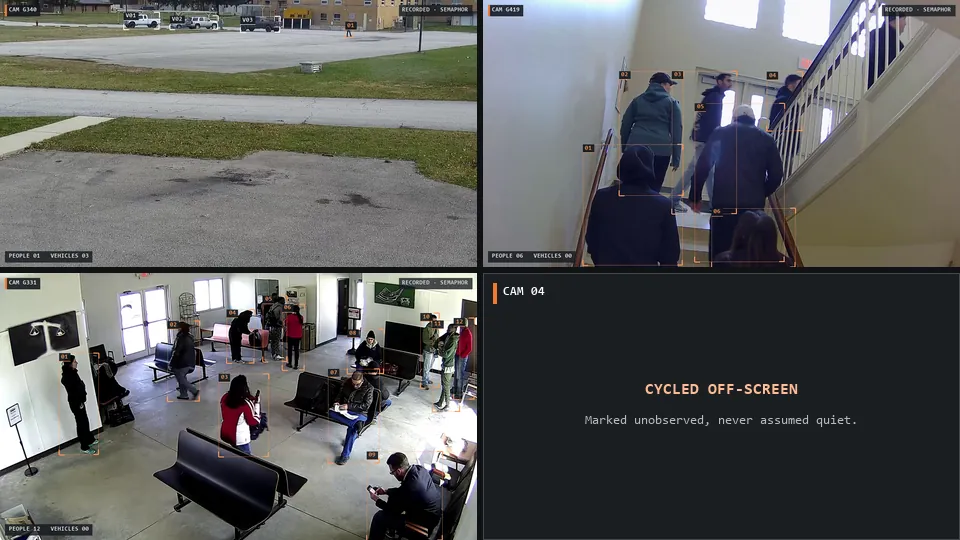
- Detection instead of staring. Object detection finds people and vehicles on every view, including the ones on the second monitor the guard is not looking at.
- Alert first, context second. The guard sees that something moved right away, then gets an explanation. Attention goes where it is needed.
- Suppression. The same parked car should not alert all night. Duplicate suppression and cooldowns keep repeated activity on one card.
- Priority. A sorted queue means the most urgent event is reviewed first, even during a busy stretch.
- Explicit coverage. The system should tell the guard which cameras were actually observed, instead of implying full coverage.
For what the job looks like from the chair, read the CCTV operator role guide, and for the desk itself, how to set up a security monitoring station.
Where Semaphor fits.
Semaphor changes the unit from cameras watched to alerts reviewed. It captures the monitoring screen your guards already use, separates each camera pane and follows the views as layouts cycle and rearrange. A camera that cycles off screen is marked unobserved, never assumed quiet.
Local person and vehicle detection runs on every pane. With alert-first review, a preliminary alert lands in the guard inbox immediately, and a vision-language model adds a scene report with the original frames beside it. Duplicate suppression keeps repeated activity quiet, and the inbox sorts cards Critical, High, Unassessed and Low. The guard reviews, decides and dispatches.
That is how a single desk covers more cameras without more guards. Our guide to covering more cameras without more guards walks through the operating model. We measure the effect on your site during a pilot: missed events, nuisance alerts, response delay and evidence review time. Start a pilot on one station, or book a live demo on your own camera screens.
Camera workload questions.
How many cameras can one security guard monitor at once?
For live viewing without alerts, published guidance points to a single monitor’s worth of views for short periods, fewer when scenes are busy. With good AI alerting, the limit shifts to how many alerts a guard can review well, which can support far more cameras.
How long can a guard watch CCTV before attention drops?
Industry guidance commonly places peak alertness in the range of about 15 to 20 minutes of continuous viewing, which is why rotation and alert-driven review matter.
Does a bigger video wall help?
Bigger tiles help image detail, but more tiles do not add human attention. A video wall is useful for context; alerts are what direct the guard’s eyes.
How many cameras per operator does a monitoring center plan for?
It depends on site activity, alert quality and other duties. The best way to set the number is to measure alerts per hour and review time on your own sites, which is what a pilot is for.