What it is.
Semaphor is screen-based AI. Instead of plugging into each camera or negotiating an API with each VMS vendor, it observes the rendered monitoring screen — the same video wall, VMS client or camera dashboard your guard is looking at — and runs its detection and analysis on the pixels it sees there. That makes Semaphor camera-agnostic and VMS-agnostic by construction. It is the fastest way to add AI to existing cameras without replacing your VMS, and it is the foundation every other capability in Semaphor is built on.
A video management system collects video from cameras, records it and gives operators an interface to watch live and recorded footage. Semaphor leaves all three jobs exactly where they are. It adds the missing fourth job: deciding which camera deserves the guard’s attention right now.
Why it matters to guards and supervisors.
No rip-and-replace.
Traditional analytics often come with a hardware or software shopping list: specific cameras, a specific recorder, a higher license tier, a vendor integration and a project plan. For a guard company serving dozens of clients, each with a different system bought at a different time, that list never ends. Semaphor needs none of it. If your guard can see the camera on screen, Semaphor can work with it.
No camera credentials.
Clients are rightly careful about who gets passwords to their cameras and recorders. Semaphor never asks for them. It does not log in to cameras, pull RTSP streams or call a vendor API. That keeps onboarding short and keeps your client’s IT team out of the critical path.
One workflow across every site.
Remote monitoring centers juggle several VMS clients side by side. With Semaphor, every one of them feeds the same guard inbox with the same priority levels, the same evidence format and the same AI scene reports. Operators learn one workflow, not one per vendor.
How it works.
Capture the screen.
Semaphor captures the monitoring screen you choose — a full video wall, a single VMS window or a browser dashboard.
Separate the panes.
Geometric pane detection finds each camera tile in the layout and crops it, keeping the original image as evidence.
Follow each camera.
Every view gets a visual feed identity that follows it as the layout cycles, resizes or rearranges.
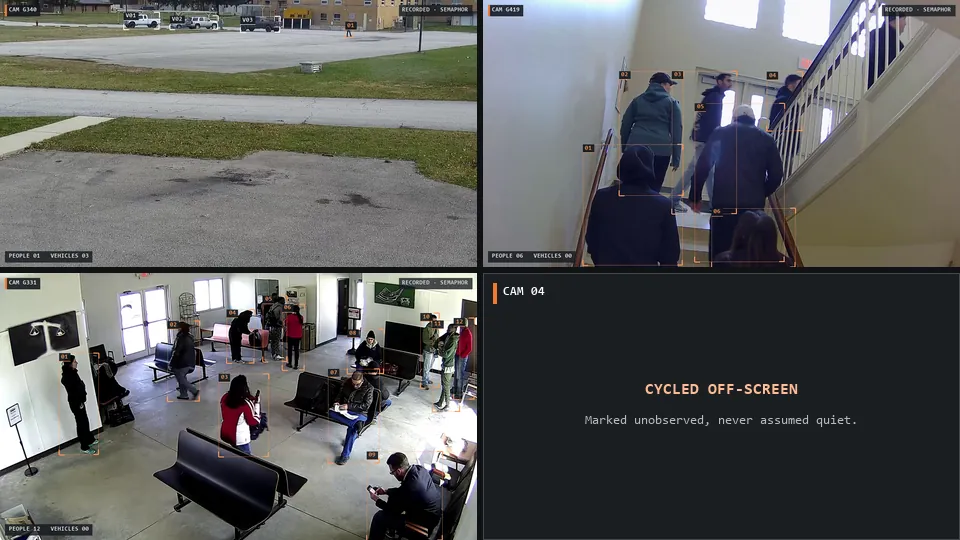
From there, each camera view flows into local person and vehicle detection, event routing, alert-first delivery and AI review. Because the input is the rendered screen, the same pipeline runs whether the tiles come from a cloud VMS, an on-premise recorder or a web portal. Camera labels, clocks and status text drawn on the tiles are kept out of scene matching, so they do not trigger alerts. For the full walkthrough, see how Semaphor works; for how tiles are followed through layout changes, see camera view tracking.
What Semaphor sees — and what it doesn’t.
Semaphor observes what is on the captured screen. That is a strength and a boundary, and we are explicit about it. A camera cycled off the wall is marked unobserved, never assumed quiet, so a supervisor always knows which cameras were actually covered. We confirm capture quality on your layouts during a pilot.
Screen-based vs integrated analytics.
VMS-integrated analytics.
- Tied to a vendor, model or license tier.
- Needs credentials and an integration project.
- Different setup at every client site.
- Upgrades wait on the vendor’s roadmap.
Semaphor, screen-based.
- Works with any VMS or video wall your guard uses.
- No camera credentials, no vendor API.
- One workflow across every client.
- New AI capabilities ship without touching the cameras.
We break down the trade-offs in detail in screen-based vs VMS-integrated analytics, and the practical steps in how to add AI to existing security cameras.
Where it matters most.
- Parking lots — older fixed cameras that will not be replaced any time soon, watched from whatever recorder the property manager bought years ago.
- Construction sites — temporary camera towers and cloud portals that change from job to job.
- Apartment and residential properties — mixed camera brands across buildings, often with no budget for a unified platform.
It is also why Semaphor fits remote video monitoring centers that run several VMS clients on one wall.
Frequently asked questions.
Can I add AI to my existing security cameras without replacing them?
Yes. Semaphor works from the monitoring screen, so the cameras, recorder and VMS stay exactly as they are. There is no hardware to swap and no vendor integration to build.
Which VMS and video wall software does Semaphor support?
Semaphor is VMS-agnostic: it observes the rendered camera views on screen rather than depending on a vendor’s API. We confirm compatibility with your specific layouts, tile sizes and image quality in a live demo or pilot.
Does Semaphor need our camera passwords or network access?
No. Semaphor does not log in to cameras or recorders. It only sees what your operator’s monitoring screen shows.
See it on your own video wall: book a live demo on your own camera screens, or start a pilot on one monitoring station.