The wall is full. Attention is not.
A remote video monitoring center sells attention. Clients pay for operators who look at their cameras at the right time and act. The reality inside the room is a video wall of tiles from dozens of client sites, workstation monitors cycling through layouts, alarm signals arriving from panels and analytics, and an operator who can only look in one place at a time. The busier the night, the more the queue backs up and the longer each alarm waits for a human to open video and decide.
Most monitoring center software is built around the alarm event: a signal comes in, the operator pulls video, verifies, calls. That works when the alarm fires. It does nothing for the tiles that never send a signal, and every client site is on different camera hardware, so the analytics you get are only as good as each site’s oldest recorder.
What slows a central station down.
- Tiles with no signal. Cameras without onboard analytics produce nothing for the queue. Activity there depends on someone happening to look.
- Verification takes clicks. For each alarm the operator opens the site, finds the right camera, scrubs back to the event and decides. Multiply that by every alarm on a busy shift.
- Nuisance activity drowns the real thing. Headlights, animals, wind in trees, the same delivery truck. Operators learn to dismiss, and then they dismiss the one that mattered.
- Evidence lives in five systems. The client wants a clip and a note. The operator has to reassemble both after the fact.
How Semaphor fits your central station.
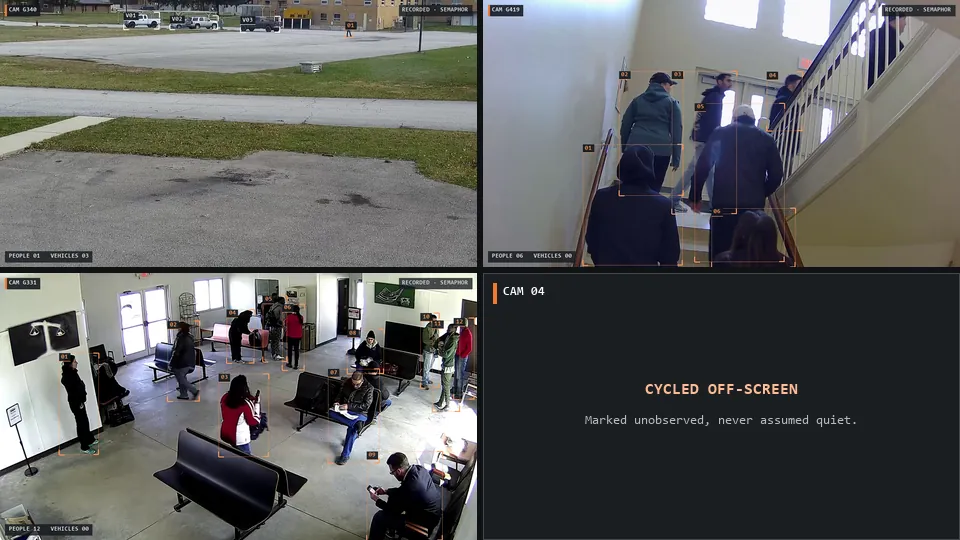
Semaphor reads the screen, not the camera. It captures the rendered video wall or workstation display, separates each camera pane and tracks each view’s identity as layouts cycle. Because it works from the pixels your operators already see, it works with your existing camera software across every client site, no matter which VMS or NVR renders it.
On every visible tile, local person and vehicle detection and pixel-change checks decide what is worth an operator’s look. Semaphor is alert-first: a preliminary activity alert publishes immediately, then an AI scene report updates the same card with what is happening, the observations behind it and a recommendation. Operators never wait on the model to see that something moved.
What the operator used to do
Scan the wall. Notice movement, maybe. Open the site. Find the camera. Scrub back. Decide. Write it up later.
What Semaphor surfaces
A card with the camera, the time, the original frames, what was detected and a short AI report. Sorted by priority. Ready to acknowledge, review and close.
An alert queue built for triage.
The inbox sorts events Critical, High, Unassessed and Low, and operators can override any level. Alert prioritization keeps the urgent card at the top even during a burst across several sites, and duplicate suppression folds repeated activity from the same camera into one evolving card instead of a stream of new alarms. The same discipline applies to security alert triage in general: one card per incident, the most urgent first.
Verified, with the evidence attached.
When an operator calls police or a client, they need to say what they saw. Every Semaphor card keeps the original frames next to the AI assessment, hashed at capture, with an exportable manifest. That is the raw material for alarm verification for police response and for the client report the next morning. See evidence and audit trail.
Coverage is part of the record too. When a wall layout cycles, Semaphor notes which cameras were on screen and which were not, so a client question about a specific camera gets a straight answer.
It fits the sites monitoring centers cover most: car dealerships, construction sites and self-storage after hours.
How to start.
Choose one operator position.
Pick a workstation or wall section that carries a representative mix of client sites and camera software.
Run it alongside your process.
Operators keep working their existing alarm queue. Semaphor runs next to it on the same screens during real shifts.
Compare the queues.
Review missed events, nuisance alerts, response delay and evidence review time. Expand across positions on the results.
Details are on the pilot page, or book a live demo on your own video wall.
Monitoring center questions.
Does it replace our central station automation platform?
No. Semaphor sits alongside the tools you already run. It adds a prioritized queue for what is visible on screen; your alarm handling and dispatch procedures stay the same.
What happens to a camera that cycles off the wall?
It is marked unobserved for that period. Semaphor never treats an off-screen camera as quiet, so coverage gaps are explicit in the record.
Can the AI model run in our own facility?
Yes. Detection runs locally, and the vision-language model can run locally or on hosted inference over verified HTTPS with authentication and optional mutual TLS. See security and privacy.