Two ways to decide what is worth a look.
Every camera alert answers one question for the guard: is this worth taking my eyes off everything else? Motion detection and AI video analytics answer it in completely different ways.
Motion detection compares one frame to the next and fires when enough pixels change inside a zone. It is built into almost every camera, NVR and VMS, it costs nothing extra and it is easy to switch on. It also has no idea what moved. A person climbing a fence, a spider on the lens, a swaying branch, rain in the floodlight and headlights sweeping across a wall all look the same to it: changed pixels.
AI video analytics runs a trained model over the image and reports objects, usually people and vehicles, with a position and a confidence score. Our guide to what video analytics is covers the wider category. The key shift is that the alert now carries meaning: a person is at the loading dock, a vehicle entered the lot after close. Modern systems go further and track objects across frames, so one person walking the length of a car park is one event rather than thirty.
Side-by-side comparison.
| Motion detection | AI video analytics | |
|---|---|---|
| What triggers an alert | Pixel change above a threshold in a zone | A detected person or vehicle, optionally with rules on top |
| Weather, lighting, foliage | Common triggers; the classic source of nuisance alerts | Largely ignored unless they hide or mimic an object |
| What the guard receives | “Motion on camera 14” | “Person near the east gate,” with the object marked |
| Tuning effort | Constant: masks, sensitivity, schedules per camera | Lower: zones and object classes, fewer per-camera tweaks |
| Still or seated people | Invisible once they stop moving | Detectable in a single frame |
| Repeat alerts | Same tree fires all night | Tracking and duplicate suppression can group repeats |
| Cost to start | Usually already included | Often needs new cameras, licenses or a VMS tier (unless screen-based) |
| Evidence for review | A clip or a timestamp | Frames with detections, and sometimes a written summary |
Why motion alerts wear guards down.
Motion detection fails in a very specific, very human way. The first night on a new post, the guard checks every alert. By the second week, the guard knows that camera 9 fires whenever the wind picks up and camera 22 fires when the sprinklers run. Alerts get acknowledged in bulk. The one that mattered gets acknowledged with them. That is the nuisance-alert problem, and it is why so many monitoring rooms quietly turn motion alerts off. We go deeper in how to reduce nuisance alerts.
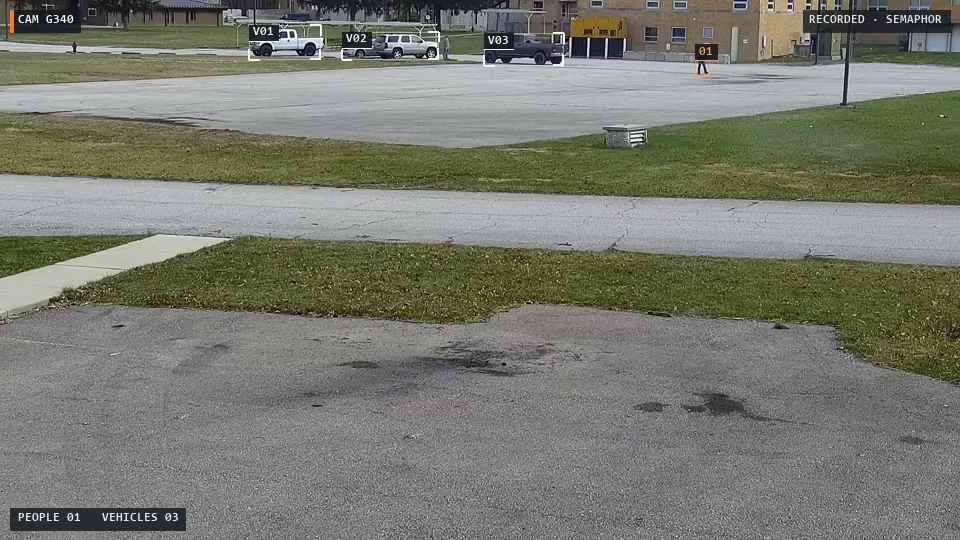
Motion detection also misses what stops moving. A person who walks into a stairwell and sits down stops producing pixel change. A vehicle that parks behind the building and idles with its lights off is a still image. Object detection sees both in a single frame.
Where AI video analytics has its own limits.
Analytics is not magic. Detectors struggle with tiny distant figures, heavy occlusion, glare and very low light. They report confidence, not certainty. And “a person was detected” is not the same as “a security incident happened”: the cleaner at 9 p.m. is a person too. That is why the best systems keep a guard in the loop and show the original frame beside every detection, so the call is made by someone who knows the post orders.
The bigger practical limit is deployment. Traditional analytics usually lives inside specific cameras, a specific VMS or a paid analytics tier. For a guard company with a different camera system at every client, that means a different upgrade project at every client.
When to choose each.
Motion detection makes sense when…
- The scene is indoor, controlled and quiet after hours, like a locked server room.
- You only need a timestamp to search recordings later.
- Nobody is watching live and alerts only feed a recording trigger.
- The budget for this site is genuinely zero.
AI video analytics makes sense when…
- Guards are watching live and alert quality decides whether they trust the system.
- Scenes are outdoors: lots, yards, perimeters, construction sites.
- You need to catch people who stand still, sit or loiter.
- One operator covers many cameras and cannot afford to chase shadows.
Where Semaphor fits.
Semaphor gives you AI analytics without the upgrade project. It works from the monitoring screen your guards already watch, separates each camera pane and runs person and vehicle detection locally. Pixel-change checks still play a role, but as one input among several, not the whole decision.
Then it does what motion detection never could. Duplicate alert suppression and cooldowns stop the same parked car from alerting all night. An alert lands in the guard inbox immediately with the original frames, and a vision-language model adds an AI scene report that says what is happening and what remains uncertain. The guard decides. Every time.
No new cameras. No new VMS. The same monitoring screen, with alerts that are about people and vehicles instead of pixels.
The fastest way to compare the two on your own sites is to see them side by side. Book a live demo on your own camera screens, or start a pilot and measure nuisance alerts before and after.
Frequently asked questions.
Is AI video analytics just better motion detection?
No. Motion detection measures pixel change; AI video analytics recognizes objects. That is why analytics can ignore rain and shadows and still see a person who is standing perfectly still.
Do I need new cameras to get AI analytics?
Not with Semaphor. Because it works from the rendered monitoring screen, it adds AI to your existing security cameras without touching them or the VMS.
Should I turn off motion alerts once I have AI analytics?
Many teams keep motion-based recording triggers and move live attention to object-based alerts. Decide per site in your post orders, and compare both during a pilot.